111WG Game APK: Understand the Menus Before You Start
Description
Introduction
111WG Game gives users several places to browse games, open an account, check promotions and manage payment details. These areas sit close together, but they serve different purposes. Choosing a game from the lobby does not explain its rules, and opening a reward banner does not establish that you can claim or withdraw the advertised amount.
This guide follows the platform’s menus in a practical order. It explains the browsing controls first, then account access, reward conditions and payment setup.
What Is 111WG Game?
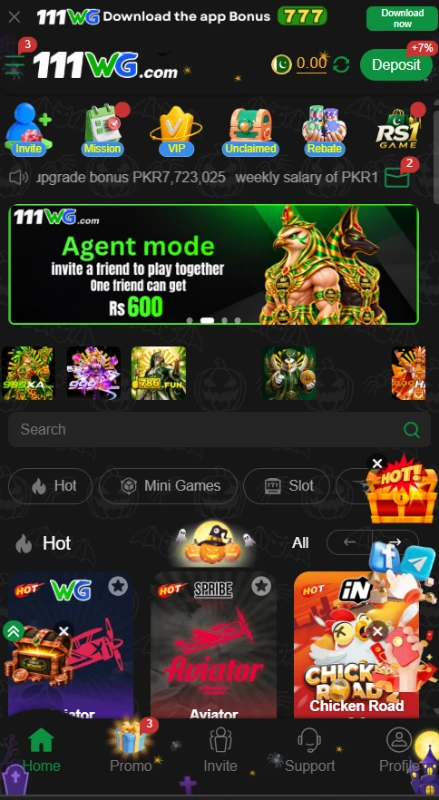
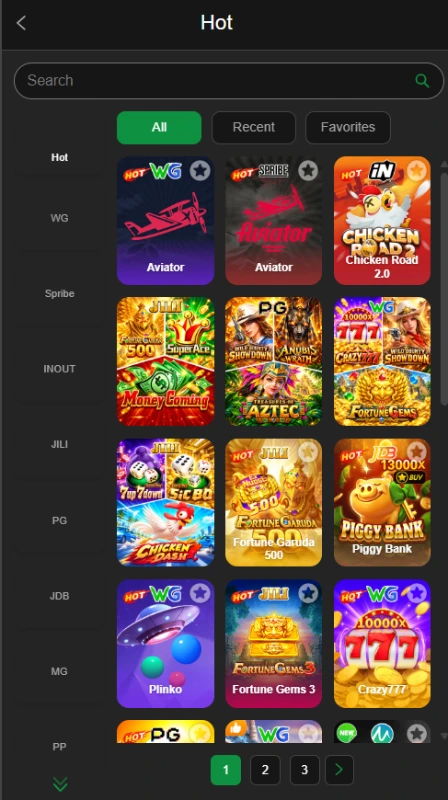
111WG combines a collection of gambling-style titles with registration, wallet and promotional tools. Its catalogue includes names such as Aviator, Chicken Road 2.0 and Plinko. Each title has its own controls and rules, so the platform does not offer one shared playing method.
The account area handles a different set of tasks. Profile provides routes to records, withdrawal management and account settings. Promo groups campaigns under separate tabs, while Support provides a place to look for assistance.
These distinctions matter because game balances, promotional offers and payment requests are not interchangeable. Users should read the relevant section before assuming that an amount represents money available for withdrawal.
| Game information | Details |
|---|---|
| Game name | 111WG Game |
| Version label | Latest |
| File size displayed | 6 MB |
| Android requirement displayed | Android 5+ |
| Downloads displayed | 5k |
| Rating displayed | 4.6/5 |
| Votes displayed | 246 |
Key Features of 111WG Game
Finding a Title in the 111WG Game Lobby
The search bar helps users locate a named title. Category controls narrow the catalogue, while All, Recent and Favorites provide different browsing views. These controls reduce the need to work through the full grid whenever you return.
Records and Withdrawal Management
Profile includes My Records and Manage withdrawal. Keeping these entries together gives users a route to account-related information without returning to the promotional area. Their presence does not establish how detailed the records are or whether a withdrawal will succeed.
Separate Promotion Tabs
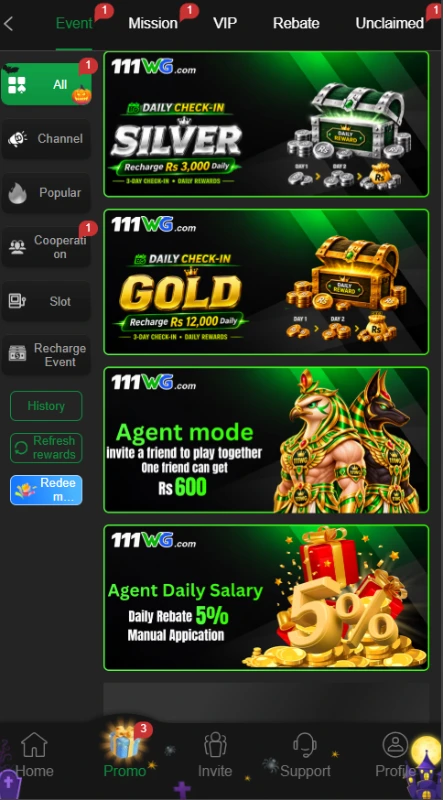
Event, Mission, VIP, Rebate and Unclaimed divide promotional information into smaller groups. A user looking for a task reward can open Mission rather than search through unrelated deposit banners.
Language and Help Controls
The language menu offers English and Urdu. Customer Service links also appear around account access, alongside the main Support destination.
How to Play 111WG Game
Begin with the selected title’s instructions. A familiar name or colourful tile does not explain its stake requirements, controls or possible outcomes.
- Open Home and browse the lobby.
- Choose a category or use the search field.
- Select a title and find its rules or help controls.
- Check any stake, balance or participation requirement before continuing.
- Distinguish promotional credit from money you have deposited.
- Use the account menus to locate relevant records when needed.
No gameplay session formed part of this review. The guide therefore does not recommend a betting pattern or describe tested payout behaviour. Gambling can result in financial loss, and earlier outcomes do not guarantee later results.
Bringing the Virtual World to Life
The 111WG Game design places bright game artwork against a dark background. Green buttons and selected tabs help identify controls, while large banners draw attention to promotional campaigns. The game catalogue uses compact tiles rather than long text descriptions.
Navigation works at several levels. The bottom row opens the main destinations. Category buttons narrow the game list, and the expanded catalogue also groups provider labels along the side. Users need to distinguish these browsing controls from the promotion menu.
The crowded layout deserves attention. Reward badges and banners can distract from smaller labels such as View event or Receiving account. Reading those labels helps users understand what a button actually opens. This assessment concerns layout and organization, not tested loading speed.
For another example of category browsing and account navigation, read our 999ig lobby guide.
111WG Game Bonuses
The platform advertises rewards through several campaigns. Each offer needs its own explanation because downloading an app, inviting a friend and making a first deposit involve different conditions.
App-Download Advertisement
The download promotion advertises Rs 777. The available material does not establish every eligibility step, claiming requirement or withdrawal restriction. Do not treat the advertised figure as an automatic cash payment.
111WG Game Welcome-Bonus Tiers
The welcome panel describes a first-deposit reward after registration. One listed tier pairs a first deposit of at least Rs 100 with a Rs 20 bonus. Another pairs at least Rs 300 with Rs 60.
The campaign advertises a range from Rs 20 to Rs 15000. The upper amount represents a promotional maximum, rather than the reward for every new account. View event provides the relevant place to investigate the offer.
Friend-Invitation Offer
A referral advertisement associates Rs 600 with inviting a friend. The material does not establish all qualifying actions. An eligible referral may require more than sending an invitation, so check the campaign’s rules before expecting a reward.
Missions and Check-In Campaigns
The Mission area separates Newplayer, Daily Mission and Weekly Mission. Tasks include account signup, saving the URL and mobile SMS verification. Go opens a task route, while Claim relates to reward collection.
Daily check-in advertisements also include recharge conditions. A check-in label does not mean that opening the platform alone qualifies every user.
VIP Progression
The VIP section connects level advancement with betting activity. Its entry-level panel lists a Rs 9000 betting requirement toward VIP1 and describes benefits such as next-level bonuses and birthday gifts.
Salary-labelled benefits are promotional rewards, not employment income. Read the requirements for each benefit separately, and avoid increasing spending simply to reach another level.
Rebates and Event Offers
The rebate area separates valid bets, rates and collectible amounts by category. Users should not assume that one percentage applies to every title.
Other events advertise redemption codes and lucky turntables. No working code was verified. Countdown-based campaigns are time-limited, and the material does not establish that separate offers can be combined.
How to Download 111WG Game APK on Android?
A Download control appears in the platform interface. However, the supplied material contains no APK package for inspection.
- Open the supplied source website at 111wg.vip.
- Check the address before selecting Download.
- Review the destination and any publisher or file information.
- Confirm the stated compatibility requirements before accepting a package.
- If you proceed, find the completed file in your browser’s Downloads list.
No numerical release has been established for the 111WG Game APK. A “latest version” label alone does not verify its contents, file size or compatibility. Avoid replacing missing information with specifications copied from unrelated download pages.
How to Install 111WG App on Android?
These are general Android instructions. They do not confirm that this particular app installs successfully.
- Locate the downloaded APK in your browser or file manager.
- Open it only after reviewing its source and available file details.
- Read any installation warning.
- If appropriate, inspect Install unknown apps for the browser or file manager handling the package.
- Allow from this source only if you have decided to proceed with a source you can verify.
- Follow the device prompts and review requested permissions.
- Turn off the source’s installation permission afterwards if you no longer need it.
Keep Play Protect enabled. If it identifies a harmful app, stop and investigate instead of disabling protection. Google’s Play Protect guidance explains these checks; it does not endorse this APK.
Registration and Login Process
111WG Game Registration
The phone/profile registration form displays the +92 country code. Password registration asks users to enter a password and repeat it in a confirmation field. A Code register option also appears.
- Select Register.
- Choose the available registration route.
- Enter the requested phone/profile information.
- Create and confirm a password when using the password route.
- Read the User Agreement.
- Confirm the over-18 declaration only if it applies to you.
- Review the form before submitting it.
A separate selector offers phone and username signup, plus Google and Telegram access buttons. Their presence does not prove that every route works. No referral-code field was verified.
Login and Account Recovery
The login form contains a phone/profile field and Password Login or Code login choices. Use the identifier associated with your account and follow the selected route’s prompts.
Remember account password and Forgot Password also appear. Avoid saving credentials on shared devices. If access fails, check your entries before using the platform’s recovery or Customer Service link. The complete recovery process remains untested.
Deposit and Withdrawal Methods
The 111WG Game payment area separates adding funds from setting up a receiving account. Always check which task a menu handles before interpreting its options.
JazzCash Deposit
Online deposit contains a JazzCash-labelled option. Its amount field displays a Rs 100 minimum and Rs 50000 maximum in the reviewed account view.
This range belongs to that option, rather than every payment route. Check the current amount field, recipient instructions and promotion explanation before submitting a payment. No deposit processing time was verified.
Crypto Deposit
Crypto has a separate deposit tab. The available material does not establish its supported asset, network or deposit-address instructions. Do not assume that the withdrawal network also applies here.
Withdrawal Password
Withdrawal setup asks users to create and confirm a separate password. The request screen also requires a withdrawal account before proceeding. Keep this password private and distinguish it from account-login credentials.
Easypaisa Receiving Account
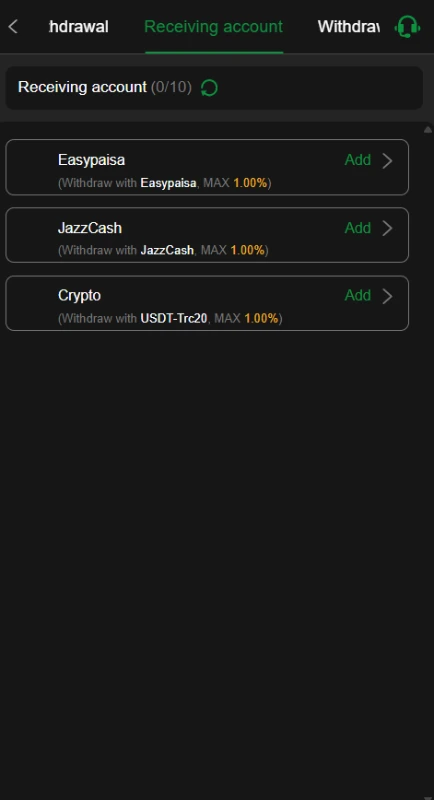
Easypaisa appears with an Add control in the receiving-account menu. Review its form before saving your receiving details. This supports describing an account option, but does not establish Easypaisa deposit availability.
JazzCash Receiving Account
JazzCash has its own Add control for receiving withdrawals. Check the current requirements separately from deposits. The deposit amount range does not establish withdrawal limits.
USDT-TRC20 Receiving Account
The Crypto receiving entry identifies USDT-TRC20. Confirm the network and address requirements in the current form. Successful transfers, fees and processing times remain unverified.
Our 718SP payment-menu guide provides another example of separate deposit and receiving-account menus. Each platform needs its own checks.
FAQs — Frequently Asked Questions
What is 111WG Game?
It is a multi-title gaming platform with account tools, promotional campaigns and payment menus. Its gambling-style activities can involve financial loss.
Is the current APK version confirmed?
No. The review did not establish a release number, file size or minimum Android requirement.
Does it offer Urdu?
The language selector includes Urdu and English. Complete translation across every section remains unverified.
Can users receive withdrawals through Easypaisa?
Easypaisa appears as a receiving-account option. That listing does not prove a completed withdrawal or establish processing times.
Does every new account receive the advertised bonus?
The material does not establish that. Each campaign has conditions, and an advertised amount does not guarantee eligibility or withdrawable cash.
Conclusion
111WG Game provides several browsing, account and promotional menus within one interface.
The useful distinction is between selecting a title, examining an offer and managing payments.
Check campaign requirements and current payment instructions separately.
Read the platform’s own terms and privacy information before sharing details or money.
ApnaAPK’s Terms and Conditions, Disclaimer and Privacy Policy explain this website’s policies.
Images