999iG APK: A Clear Guide to Games, Login and Payments
Description
Introduction
999iG gives visitors several places to explore: a game lobby, a promotion area and account menus for registration and payments. You can browse titles such as Aviator, Chicken Road 2.0 and Plinko, or open the reward tabs to read about missions and membership benefits. The first useful step is to understand which menu handles each task.
This guide follows those menus and explains the details that matter before downloading or registering. It covers the available account routes, the selected JazzCash deposit channel and the separate withdrawal-account options. It also explains why a reward amount on a banner needs more checking than a quick glance.
What Is 999iG?
999iG is a platform containing several casino-style games, rather than a single game with one set of controls. Categories help divide the lobby into smaller groups. Hot, Mini Games, Slot, Fishing and Cards appear among the browsing choices, while provider labels offer another way to narrow the list.
The 999iG account system sits alongside the game library. Users can open registration, change the interface language or find payment controls without treating these as part of an individual game. Phone and username signup options appear, together with Google and Telegram login buttons.
The promotion area has its own organization. Event contains campaign banners, Mission lists tasks, and VIP presents level-related benefits. Rebate and Unclaimed appear as separate tabs. Understanding these labels helps you locate information, but the labels alone do not explain every offer’s conditions.
| Game Information | Details |
|---|---|
| Game Name | 999iG |
| Version | 1.0.7 |
| File Size | 7 MB |
| Developer | 999iG |
| Platform | Android |
| Categories | Apps, Games |
| Downloads | 5K |
| Rating | 4.5/5 |
| Requirement | Android 5 and above |
Key Features of 999iG
999iG Search and Game Filters
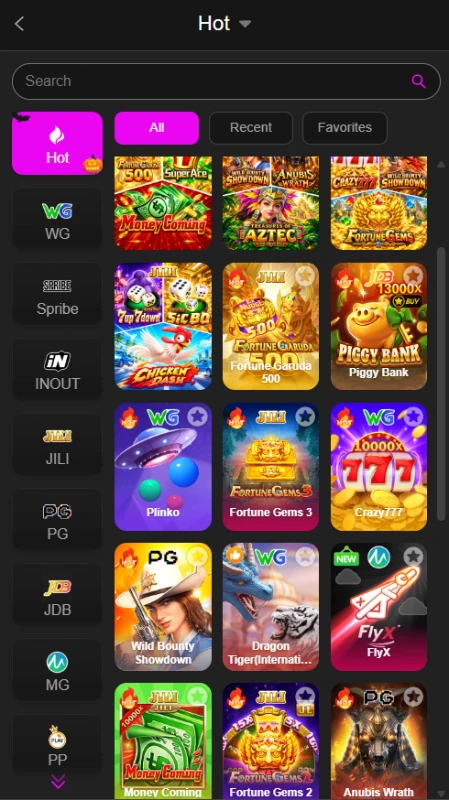
The Hot page puts a search field above the game grid. All, Recent and Favorites controls sit nearby, while provider filters run down the side. If you know a title’s name, search offers a more direct starting point than scrolling past unrelated artwork.
Promotion Menus With Different Purposes
Event, Mission and VIP lead to different kinds of information. For example, a new-player task belongs in Mission, while a membership benefit belongs in VIP. This distinction helps readers check the relevant rules instead of assuming every offer works alike.
A Separate Receiving-Account Area
The payment menus distinguish requesting a withdrawal from adding its destination. Easypaisa, JazzCash and Crypto each have an Add control in the receiving-account list. This is a separate step from choosing a deposit channel.
Language Selection and Account Help
The language menu provides English and Urdu choices. Support appears in the main navigation, and Customer Service appears within registration. These controls identify where to look for help; support hours and response times have not been confirmed.
How to Play 999iG
Begin by choosing a title, then read that title’s own instructions. A provider name or game category does not explain how a round works, what a control does or whether it uses money.
- Open Home and browse the lobby categories.
- Select a game by name, or use the search field.
- Read its rules and identify the controls before starting.
- Check any account-access or balance requirement.
- If a round involves a stake, understand the amount and confirmation step.
- Use the platform’s account menus for payment tasks rather than looking for those controls inside every game.
The reviewed material does not establish a tested walkthrough of individual rounds or a demo mode. Casino-style games can involve financial loss. A game’s position in the Hot list does not establish its odds or make it a source of income.
Bringing the Virtual World to Life
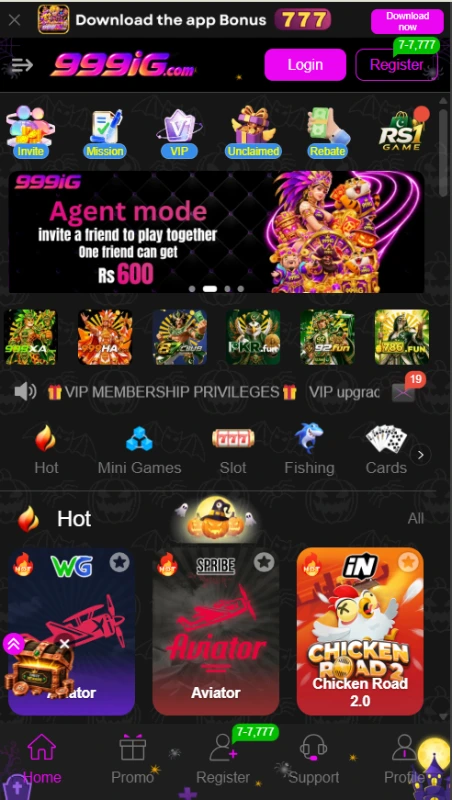
The 999iG lobby uses bright game artwork against a dark background. Pink and purple buttons mark actions such as Login and Register. Near the top, the download banner and promotion shortcuts compete for attention with invitation banners and membership notices.
The game grid provides a different type of navigation. Category icons group titles, while provider labels such as WG, Spribe, INOUT, JILI and PG help filter the selection. Fortune Gems 3, Crazy777 and Money Coming appear among the tiles. These labels describe the displayed library, not independently verified provider partnerships.
Home, Promo, Support and Profile appear in the bottom menu. Registration or invitation controls occupy another position depending on the account state. Within Promo, another row divides events, missions and membership information.
This layout offers several routes to the same broad task, which can help once you learn the labels. The crowded banners also make it easy to confuse separate campaigns. Open the named offer before reading its amount as an account entitlement. For another navigation example, see our 786fun lobby and account guide.
999iG Bonuses
The 999iG offers below come from the supplied platform material. Availability can change, and each campaign needs its own eligibility check. A listed maximum does not describe the amount every user will receive.
App-Download Offer
The download banner advertises Rs 777. It does not provide enough information to confirm every qualifying step or withdrawal restriction. Downloading an app should therefore not be described as automatically producing Rs 777 in withdrawable money.
999iG New-Player Tasks
The mission list includes Save URL, Sign up an account, Mobile SMS verification and “Login to the APP (First deposit).” The displayed reward range for each is Rs 7 to Rs 7777. The top amount is an advertised ceiling.
The new-player terms require first-time registration, SMS verification and birthday settings. They also require manual claims within a stated period and say rewards expire. A 5× turnover condition applies before withdrawal, with restrictions on qualifying games.
For a simple example, a Rs 200 bonus with 5× turnover would require Rs 1000 in qualifying bets. That calculation explains the rule; it does not mean Rs 1000 must remain in the balance or that completing the turnover guarantees payment.
First-Deposit Campaigns
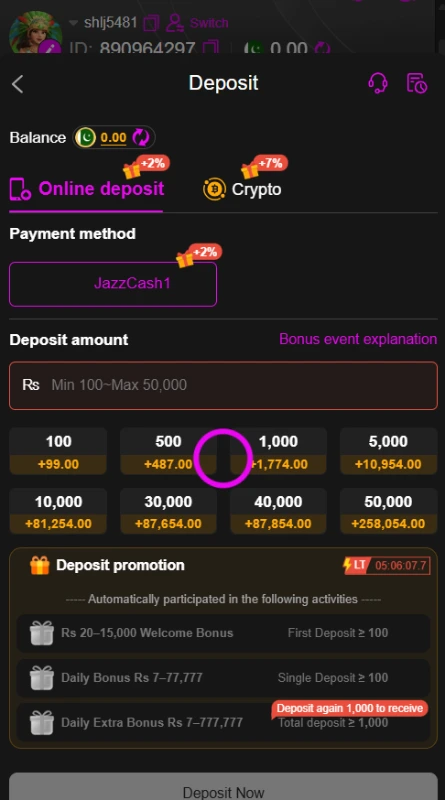
One event advertises a 20% first-deposit bonus. Separately, the selected deposit screen lists a welcome-bonus range of Rs 20 to Rs 15000 with a first-deposit requirement of at least Rs 100.
The material does not establish that these describe the same campaign or that they can be combined. Check the selected offer’s explanation before attaching either amount to a payment.
Other Deposit Promotions
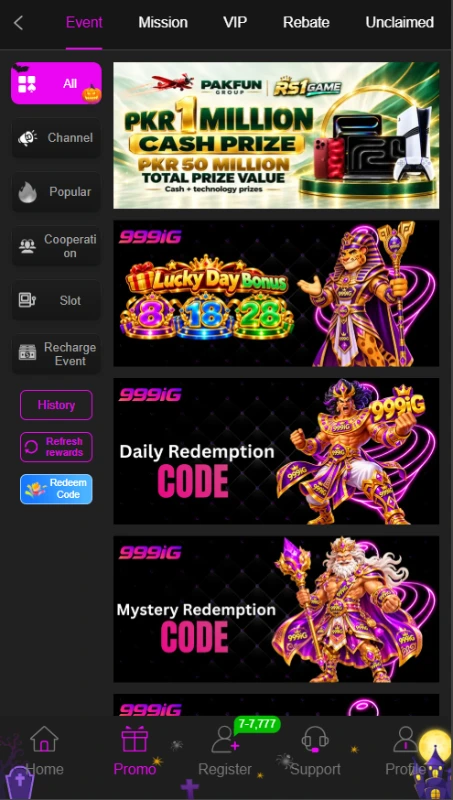
Another event banner advertises a 20% deposit bonus. Its existence does not establish that every deposit qualifies. The selected payment page also displays smaller percentage badges beside payment choices; those labels should not be added together as one combined reward.
Invite-a-Friend Offer
The Agent mode banner advertises Rs 600 for an invited friend. The full qualification steps remain unverified. An invitation, a registration and an eligible referral can mean different things, so do not treat a shared link alone as proof of a reward.
Daily Check-In Tiers
Iron, Bronze, Silver and Gold campaigns list daily recharge requirements of Rs 500, Rs 1000, Rs 3000 and Rs 12000 respectively. These figures describe required recharges, rather than the reward amounts. Opening the app alone does not meet a stated recharge condition.
VIP Benefits
The membership area lists monthly rewards, next-level bonuses and birthday gifts. The entry-level view states a betting requirement of Rs 9000 toward VIP1. Benefits depend on their level and activity conditions; a salary label describes a platform promotion, not employment income.
Codes and Time-Limited Offers
Daily Redemption Code and Mystery Redemption Code banners appear alongside a Redeem Code control. No working code has been verified. A countdown on a deposit promotion also signals that at least some offers have time limits.
Our 718SP bonus and reward guide discusses another platform’s campaigns. Use it as a separate reference; its terms do not establish the rules here.
How to Download 999iG APK on Android?
The 999iG app-download control appears in the platform interface. However, no APK file was inspected for this review, so its version, size and minimum Android requirement remain unverified.
- Confirm the platform address and download source before proceeding.
- Locate the Download now button.
- Check the destination and any file information it provides.
- If it supplies an APK and you choose to continue, complete the download.
- Find the file in your browser’s download list or your phone’s Downloads folder.
These steps explain the available entry point, not a tested download. A latest-version label on a third-party page does not establish the contents or compatibility of a file.
How to Install 999iG App on Android?
Android may request permission for the browser or file manager that opens an APK. This permission allows that source to start installations; it does not certify the downloaded app.
- Open the downloaded file only after checking its source.
- Read the installation prompt and any device warning.
- If requested, review Install unknown apps for the relevant browser or file manager.
- Allow that source only if you understand the request and choose to proceed.
- Follow the installation prompts without dismissing harmful-app warnings.
- Turn off the source’s installation permission afterward if you no longer need it.
Keep Play Protect enabled. After installation, review requested app access through your phone’s settings. Google’s Android app-permissions guide explains how to allow or deny access. The exact menu wording can vary between devices.
Registration and Login Process
999iG Registration Options
The 999iG account selector offers Phone signup and Username signup. The registration form includes password registration and a code-registration choice.
- Open Register and choose the route you need.
- For phone signup, check the +92 prefix and enter your phone number.
- For password registration, enter a password and repeat it in the confirmation field.
- Read the User Agreement and the over-18 declaration.
- Confirm the declaration only if it applies to you and you accept the agreement.
- Submit the form and follow its remaining instructions.
The complete code-registration process has not been tested. It would be inaccurate to describe one verification sequence as compulsory for every signup route.
Returning to an Existing Account
Open Login and follow the prompts for your existing account. Google and Telegram access buttons also appear. Choose the route linked to your account rather than assuming the buttons create interchangeable logins.
If a login fails, review your chosen route and entered details before contacting Customer Service. Keep account passwords, wallet PINs and verification codes private.
Deposit and Withdrawal Methods
The 999iG payment area contains separate controls for adding funds, setting up receiving accounts and requesting withdrawals. A method listed in one area should not automatically be presented as available in all three.
JazzCash Deposit
Online deposit displays a selected channel called JazzCash1. Its amount field states Rs 100 to Rs 50000. That range belongs to the selected channel and does not establish a permanent limit across accounts or other methods.
Preset amounts appear below the field, together with a Bonus event explanation link. Review the current instructions, recipient details and promotion terms before submitting a payment. Deposit fees and crediting times remain unverified.
Crypto Deposit Tab
A Crypto tab appears beside Online deposit. The supplied deposit material does not confirm its asset, network, address or amount limits. In particular, the USDT-TRC20 label in receiving-account setup does not establish the deposit network.
Easypaisa Receiving Account
The receiving-account list includes Easypaisa with an Add control. This provides an entry point for withdrawal-account setup. It does not confirm Easypaisa deposits.
JazzCash Receiving Account
JazzCash has a separate Add control in the same list. Check the requested receiving details before saving them. Sending a deposit through JazzCash does not by itself establish a saved JazzCash withdrawal destination.
USDT-TRC20 Receiving Account
The Crypto receiving option explicitly names USDT-TRC20. The request page also offers Convert to crypto. Exchange rates, conversion charges and transfer times have not been verified.
Withdrawal Password and Request
Withdrawal setup asks for a separate six-digit password and confirmation. The request area includes Normal withdrawal and Convert to crypto, and it prompts users to add an account before entering an amount.
The MAX 1.00% badge does not explain itself clearly enough to label it a fee or reward. Check the applicable conditions before proceeding. No minimum withdrawal, maximum withdrawal or completion time has been verified, and no transaction was tested for this review.
FAQs — Frequently Asked Questions
Does the platform contain just one game?
999iG groups several titles into categories and provides separate account, promotion and payment menus.
Is the APK version confirmed?
No numerical version, file size or minimum Android version has been verified. The download button alone does not establish these details.
Can I register with a username?
A Username signup option appears alongside Phone signup. Google and Telegram login buttons also appear.
What deposit range is listed?
The selected JazzCash1 channel displays Rs 100 to Rs 50000. Check its current instructions because this is not a confirmed universal limit.
Does Easypaisa appear for payments?
It appears in receiving-account setup for withdrawals. Easypaisa deposit support has not been established.
Can I withdraw every advertised bonus immediately?
No. Campaigns have separate conditions. The new-player mission terms include manual claims, expiry and 5× turnover before withdrawal.
Conclusion
999iG offers a category-based lobby, several account-access choices and separate payment controls. Its promotion area needs careful reading because campaign headlines and claim conditions serve different purposes. APK specifications and transaction outcomes remain unverified. Read the platform’s own agreement before using paid features. For this website’s publishing scope and data practices, review ApnaAPK’s Terms and Conditions, Disclaimer and Privacy Policy.
Images