
S1 Game APK: Explore the Lobby, Login and Payment Tools
Description
Introduction
S1 Game has several parts that deserve attention before its download button: a searchable game lobby, two account-access routes, separate payment controls and a busy promotion area. Knowing where these tools sit makes the platform easier to understand, especially when a reward banner leads somewhere different from the deposit or withdrawal menu.
This guide follows those menus in the order a new visitor would use them. It explains the listed features, the conditions attached to advertised rewards and the details that still need confirmation. It does not treat casino-style games as a source of dependable income. The registration form requires an over-18 declaration, and wagering can result in financial loss.
What Is S1 Game?
S1Game is a mobile-focused online gaming platform with several game categories under one account system. Its branding also appears as S1.GAME. The interface offers English and Urdu, uses rupee amounts and lists payment options familiar to Pakistani users.
The S1 Game source website advertises access through a mobile browser. The lobby also includes a Download App banner. Those are different access options: a browser page does not establish the specifications of an Android installation file, and a download banner does not verify its latest release.
| Detail | Reviewed information |
|---|---|
| Platform | S1 Game / S1.GAME |
| Source website | www.s1game.win |
| Listed categories | Slots, mini games, cards, live, fishing, sports, lottery and e-sports |
| Languages | English and Urdu |
| Registration options | Password registration and Code register |
| Login options | Password Login and Code login |
| Deposit controls | Easypaisa, JazzCash, QR-code control and a separate Crypto tab |
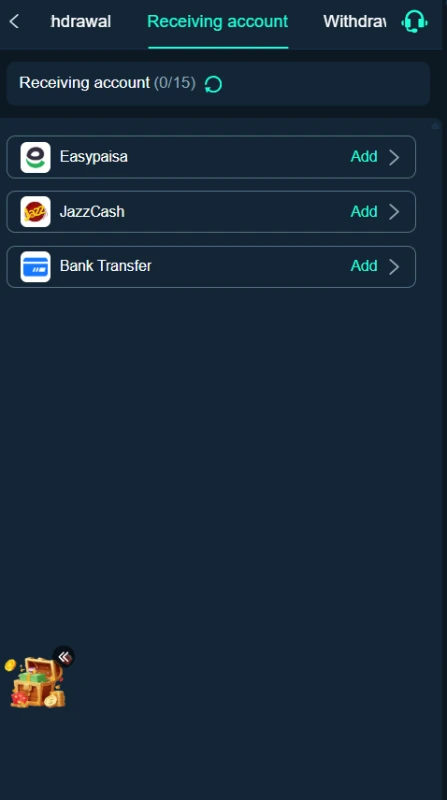
| Receiving accounts | Easypaisa, JazzCash and bank transfer |
| APK version | Latest |
| APK size | 6MB |
| Minimum Android version | 5+ |
Key Features of S1 Game
S1 Game Search and Provider Tabs
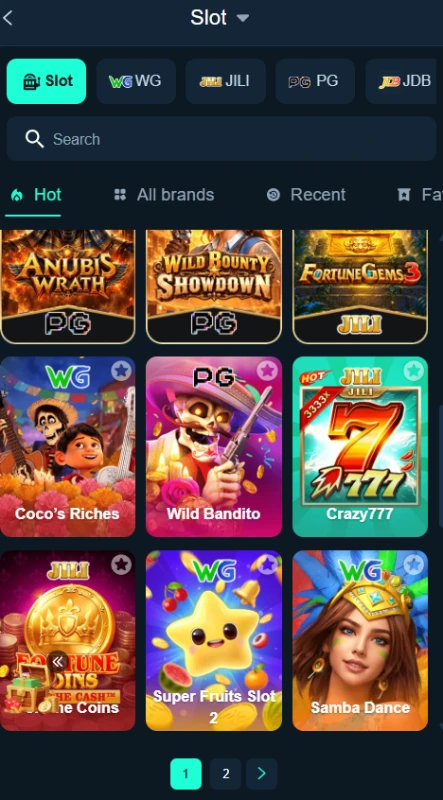
The S1 Game slot section places a search field above its game cards. Provider tabs include WG, JILI, PG and JDB. Search helps locate a named title, while provider filters narrow the collection without requiring users to inspect every tile.
Different Routes for Games and Account Tasks
The bottom navigation lists More, Home, Casino, Promo and Profile. Casino leads toward the game collection, while Promo organizes offers and tasks. Deposit and receiving-account screens handle different financial actions rather than sharing one general payment form.
Language Selection
English and Urdu appear in the language menu. This gives users a choice when reading interface labels. The available material does not establish whether every individual game, agreement or help page supports a complete translation.
Password Recovery and Customer Service
The account page includes Forgot Password and Customer Service links. A Demo entry also appears nearby. These controls identify available routes, but they do not confirm recovery requirements, support response times or free demo access to every title.
How to Play S1 Game
There is no single gameplay method for the entire collection. A slot title, a fishing game and a sports section can involve different rules and controls.
- Open the lobby and choose the category you want to inspect.
- Use a provider tab or enter a title in search.
- Open the selected title and read its own rules or help information.
- Check the controls, stake amount and participation requirements before taking part.
- Use the account tools if the selected activity requires login.
- Review wallet and bonus conditions separately before any action involving money.
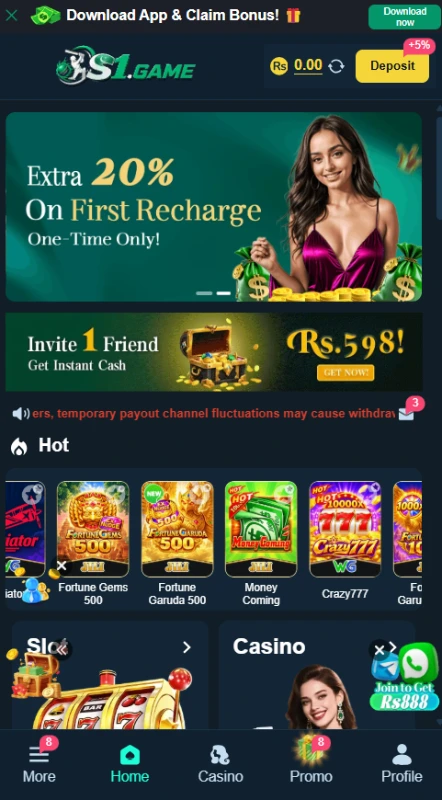
The listings include Fortune Gems 500, Fortune Garuda 500, Money Coming, Crazy777 and Lucky Neko. Their presence confirms named entries in the collection, not tested gameplay or payout performance.
Bringing the Virtual World to Life
The S1 Game interface uses a dark navy background for a consistent appearance. Turquoise marks selected tabs and important buttons, while colourful artwork separates individual games. The slot list uses a three-column grid with provider labels beneath the titles.
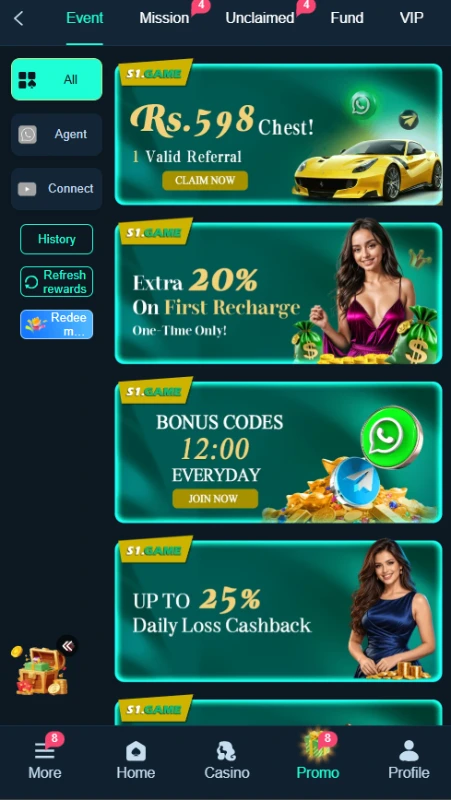
The lobby and promotion area use different layouts. Games appear as cards; offers appear mainly as stacked banners. Within Promo, tabs include Event, Mission, Unclaimed, Fund, VIP, Rebate and History. This organization helps users distinguish an event from an ongoing task or a VIP benefit.
Large offers and floating promotional elements also occupy space on the mobile display. Closing a pop-up can make the smaller navigation controls easier to inspect. The layout supports a useful interface review, but it does not establish loading speed or performance across different devices.
S1 Game Bonuses
Read the rules for each S1 Game campaign separately. A percentage, prize label or Claim button does not explain every qualification or establish that the reward is immediately withdrawable.
Seven-Day Check-In
The check-in panel organizes rewards across seven days. It also includes deposit and betting progress, so opening the platform alone does not satisfy every requirement. Review the current day’s conditions and any continuity rules before expecting credit.
First-Deposit Extra Reward
This panel ties rewards to first-deposit thresholds after registration. One listed tier advertises a reward of Rs 50 for a first deposit of at least Rs 300. This describes a qualifying offer, not a payment for creating an account. Check the event’s full terms, claim process and withdrawal restrictions.
One-Time First Recharge
A separate banner advertises an extra 20% on the first recharge and labels it one-time only. Do not add that percentage to the first-deposit extra reward unless the current campaign rules explicitly allow both offers together.
Referral Chest
The referral offer advertises a chest worth Rs 598 for one valid referral. The qualification matters: sending an invitation does not establish that the invited person has met the conditions. Review the eligibility and claim rules before assuming a reward is due.
Missions and Reset Periods
The Mission area separates Newplayer, Daily Mission and Weekly Mission tasks. Entries include recharge and wagering progress, and the daily area has a reset countdown. Each task needs its own assessment; a completed deposit does not necessarily complete a wagering mission.
VIP Benefits
The VIP page includes level progress, a reward list and a Rules tab. Entries connect benefits to level and activity requirements. Promotional labels such as monthly salary describe platform rewards, not employment or dependable income.
Rebates, Cashback and Codes
The Rebate area distinguishes estimated rebates, valid bets and claimed totals. A separate event advertises up to 25% daily loss cashback. That figure is a maximum advertised percentage, not a rate every user automatically receives.
Bonus-code and prize-code events also appear. No currently working code or complete redemption terms have been verified. Check the active event’s expiry and eligibility instead of assuming that an advertised code offer remains available.
How to Download S1 Game APK on Android?
The platform includes a Download App control, but the APK itself has not been independently verified for this review. Its size, current version number and minimum Android requirement remain unconfirmed.
- Open the supplied source website in your browser.
- Locate Download App and inspect the destination before following it.
- Read any release and compatibility details the source supplies.
- If it offers an Android APK, review the browser’s warning before deciding whether to download.
- Locate the completed file in Downloads and check that it matches the file you intended to obtain.
Do not fill gaps with version numbers or file sizes from unrelated download pages. A similarly named APK does not establish that it belongs to the intended platform.
How to Install S1 Game App on Android?
The following steps describe Android’s general installation process. They do not report a tested installation of this package.
- Open the APK only after checking its source and available file details.
- Read the installation prompts and any security warning.
- If Android requests source permission, review which browser or file manager will receive it.
- Allow that source only if you understand the permission and decide to continue. The permission does not verify the APK.
- Follow the installer prompts without disabling Play Protect or bypassing a harmful-app warning.
- Review the app’s access requests and turn off the source’s installation permission afterward if you no longer need it.
Android explains source-specific permissions in its installation guidance for apps outside Google Play.. Menu names vary by device and operating-system version.
Registration and Login Process
S1 Game Registration
To register with S1 Game, select Register and review the available method. The password-registration form includes Pakistan’s +92 country code, a phone number/profile field, a password field and a strength indicator.
Enter the requested account details and create a unique password. Read the User Agreement, then confirm the over-18 statement only if it applies to you. Review the entries before pressing Register.
Code register appears as a separate option. Google and Telegram binding icons also appear, but their later authorization steps remain unverified. The reviewed password form does not establish a mandatory email address, referral code or OTP step.
S1 Game Login
Open Login and use the registered phone number/profile and password for the password route. The page also offers Code login, Remember account password and Forgot Password.
Use the recovery control if you cannot remember your password, then follow the actual instructions it provides. Do not assume a particular code-delivery method. Leave password remembering off on a shared device, and keep login codes private.
Deposit and Withdrawal Methods
S1 Game deposit controls and receiving accounts serve different purposes. Adding a destination account does not itself request a withdrawal or confirm that a payment will arrive.
Easypaisa
Easypaisa appears under Online deposit and in the receiving-account list. For deposits, review the current route and recipient instructions. For receiving-account setup, select Add beside the service and enter only the information the actual form requests.
JazzCash
JazzCash also appears in both areas. Check the selected method and amount before submitting a payment. Keep the receipt and transaction reference, and never share your wallet PIN or OTP with another person.
Bank Transfer
Bank Transfer appears as a receiving-account option. The reviewed deposit panel does not establish a separate bank-deposit route. Confirm the receiving form’s requirements rather than guessing which bank details it needs.
QR-Code Payment
The Online deposit area includes a QR-code control. Follow the instructions for the selected route and review the recipient and amount before authorizing a transfer. QR payment availability does not establish a QR withdrawal option.
For another explanation of channel differences, read our 111WG guide to QR payments and bonus rules. Its payment details apply to that separate platform.
Crypto Tab
Crypto appears as a separate deposit tab. The available material does not verify supported coins, blockchain networks or a crypto cash-out procedure. A tab label alone does not provide enough information to attempt a transfer.
Displayed Deposit Range
The reviewed Online deposit panel lists Rs 100 as the minimum and Rs 50000 as the maximum. Treat that as the displayed range for that panel, not a permanent rule for all methods or accounts. Its deposit promotion includes a countdown, so that offer is time-limited.
Withdrawal Password and Receiving Accounts
The withdrawal area requests a withdrawal password and confirmation before receiving-account setup. This control is separate from ordinary login. Keep it private and check the destination details carefully.
The complete withdrawal request flow, fees, general withdrawal limits and processing times remain unverified. Our 1ee guide to payment menus and receiving accounts offers a separate example of why deposit and payout controls need individual checks.
FAQs — Frequently Asked Questions
Does the platform offer browser access?
The source website advertises mobile-browser access. This does not establish that every app feature works through the browser.
Is the latest APK version confirmed?
No numerical version, file size or minimum Android requirement has been verified for this review.
Which local payment options appear?
Easypaisa and JazzCash appear in deposit and receiving-account areas. Bank Transfer appears as a receiving-account option, and the deposit page includes a QR-code control.
Does registration alone qualify for the first-deposit reward?
No. The offer refers to a qualifying first deposit after registration. Read the event rules for all remaining requirements.
Are successful withdrawals confirmed?
No. Receiving-account options and a withdrawal-password form establish interface controls, not a completed payout or a processing-time promise.
Conclusion
S1 Game gives users separate places to browse titles, access an account, inspect promotions and manage payment settings. Its local options and language selector provide useful details to review before participation.
APK specifications and payout performance remain unverified. Read the platform’s own rules, and review ApnaAPK’s Terms and Conditions, Disclaimer and Privacy Policy for this website’s information practices.
Images